
NXLINK-IFrame-嵌入接口文档和说明
NXLINK IFrame 嵌入接口文档和说明
本文档适用于 CRM 或其他业务系统嵌入 NXLINK IFrame,并通过 postMessage 向 IFrame 发送客户 WhatsApp 会话参数,以及接收会话标签与总结回调。
1. Demo 样例
使用 NXLINK 账号登录 IFrame(NXLINK 平台)。
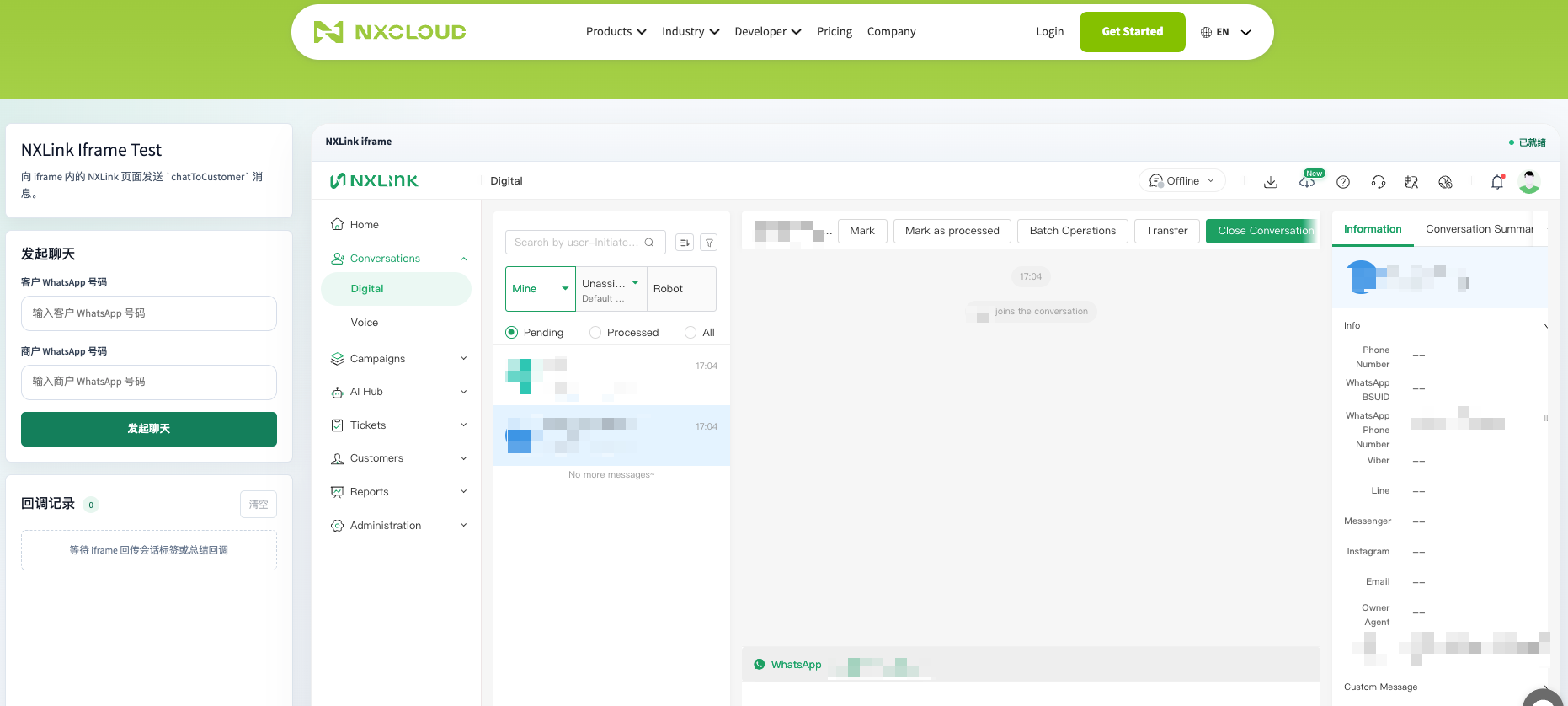
在左侧输入客户的 WhatsApp 号码和商户的 WhatsApp 号码,点击“发起聊天”后,即可直接跳转到右侧聊天框页面。
2. 接入地址
当前示例使用的 NXLINK IFrame 地址:
https://app.nxlink.ai/admin/#/对应的 origin:
https://app.nxlink.ai示例代码:
const iframeUrl = 'https://app.nxlink.ai/admin/#/'
const iframeOrigin = new URL(iframeUrl).origin
3. IFrame 嵌入方式
推荐的 IFrame 配置:
<iframe
  id="nxlink-iframe"
  name="nxlink-iframe"
  src="https://app.nxlink.ai/admin/#/"
  allow="camera *; microphone *; autoplay *; clipboard-read *; clipboard-write *"
  referrerpolicy="strict-origin-when-cross-origin"
  title="NXLINK call center"
></iframe>| 属性 | 说明 |
|---|---|
src |
NXLINK 页面地址 |
name |
便于通过 window.frames['nxlink-iframe'] 获取 IFrame window |
allow |
允许麦克风、摄像头、自动播放和剪贴板能力 |
referrerpolicy |
控制 Referer 发送策略,不直接决定 Cookie 是否可用 |
实际示例中,src 由 script.js 动态赋值:
elements.iframe.src = iframeUrl4. 发送消息
CRM 页面通过 window.postMessage 向 NXLINK IFrame 发送消息。
4.1 消息类型
chatToCustomer4.2 请求结构
{
  type: 'chatToCustomer',
  data: {
    whatsapp: '<客户 WhatsApp 手机号>',
    businessNumber: '<WA 商务号码>',
  },
}| 字段 | 类型 | 必填 | 说明 |
|---|---|---|---|
type |
string | 是 | 固定为 chatToCustomer |
data.whatsapp |
string | 是 | 客户 WhatsApp 手机号 |
data.businessNumber |
string | 是 | WA 商务号码 |
4.3 发送示例
const iframeUrl = 'https://app.nxlink.ai/admin/#/'
const iframeOrigin = new URL(iframeUrl).origin
const iframe = document.querySelector('#nxlink-iframe')

const message = {
  type: 'chatToCustomer',
  data: {
    whatsapp: '85261234567',
    businessNumber: '85270000000',
  },
}

iframe.contentWindow.postMessage(message, iframeOrigin)
当前 v2-static 示例会在点击 Send message 后发送一次消息:
iframeWindow.postMessage(message, iframeOrigin)不要在生产代码中使用
*作为targetOrigin。请使用明确的https://app.nxlink.ai。
5. NXLINK IFrame 会话标签与总结回调
本节适用于通过 IFrame 嵌入 NXLINK 的 CRM 或其他业务系统,说明坐席保存会话标签、会话总结或业务记录后,CRM 父页面如何通过浏览器 postMessage 接收回调数据。
5.1 功能说明
当 NXLINK 以 IFrame 方式嵌入 CRM 页面时,坐席在 NXLINK 中保存会话标签、会话总结或业务记录后,NXLINK 会通过 window.postMessage 将结果回传给 CRM 父页面。
本功能覆盖数字会话和语音会话场景:
| 业务动作 | 回调事件 |
|---|---|
| 保存会话标签或通话标签 | event: "tag" |
| 保存会话总结、备注或业务记录 | event: "summary" |
以下场景不会回传总结:
- AI 自动生成但尚未由坐席确认或保存的总结草稿;
- 未打开结束确认弹窗而直接关闭的会话;
- 批量关闭的会话。
5.2 CRM 接收方式
CRM 父页面需要监听浏览器的 message 事件,并只处理 type 为 conversationCallback 的消息。
5.2.1 基础示例
window.addEventListener('message', (event) => {
  if (event.data?.type !== 'conversationCallback') {
    return
  }

  const callback = event.data.data
  console.log('会话回调:', callback)
})
5.2.2 推荐的安全校验
生产环境必须校验 event.origin,建议同时校验消息是否来自目标 IFrame,避免处理其他页面或脚本发送的消息。
const iframeUrl = 'https://app.nxlink.ai/admin/#/'
const iframeOrigin = new URL(iframeUrl).origin
const iframe = document.querySelector('#nxlink-iframe')

window.addEventListener('message', (event) => {
  if (event.origin !== iframeOrigin) {
    return
  }

  if (event.source !== iframe.contentWindow) {
    return
  }

  if (event.data?.type !== 'conversationCallback') {
    return
  }

  handleConversationCallback(event.data.data)
})
请根据实际部署环境配置
iframeUrl。不要在生产环境中省略来源校验,也不要使用任意来源匹配方式。
5.3 回调消息格式
NXLINK 发送的消息结构如下:
{
  "type": "conversationCallback",
  "data": {
    "event": "tag", // tag:标签;summary:总结、备注或业务记录
    "architecture": "v1",
    "request": {},
    "customerId": "",
    "occurredAt": 1710000000000,
    "conversation": {},
    "channel": ""
  }
}
5.3.1 字段说明
| 字段 | 类型 | 说明 |
|---|---|---|
type |
string | 固定值:conversationCallback |
data.event |
string | 变更类型:tag 表示标签保存,summary 表示总结、备注或业务记录保存 |
data.architecture |
string | 架构标识。当前值为 v1;CRM 可忽略该字段 |
data.request |
object | NXLINK 本次实际发送的接口或 WebSocket 请求参数。字段会因会话渠道和架构不同而变化 |
data.customerId |
string | 当前会话的 conversation.customer_id;无值时为空字符串 |
data.occurredAt |
number | NXLINK 触发回调时的前端毫秒时间戳 |
data.conversation |
object | 当前会话的完整原始数据,可用于关联会话、客户和渠道 |
data.channel |
string | number | 当前会话中的原始渠道值,不做统一转换 |
5.4 标签回调
5.4.1 回调示例
{
  "type": "conversationCallback",
  "data": {
    "event": "tag",
    "architecture": "v1",
    "request": {
      "tags": [1001, 1002],
      "customer_id": "customer_001"
    },
    "customerId": "customer_001",
    "occurredAt": 1710000000123,
    "conversation": {
      "customer_id": "customer_001",
      "saas_conversation_id": "conversation_001",
      "chat_channel": 2
    },
    "channel": 2
  }
}
5.4.2 字段差异
标签回调会保留原始接口字段。不同渠道的 request 结构可能不同,例如:
- 数字渠道可能包含
tags、customer_id等字段; - 语音渠道可能包含
callId、labelId、labelName、direction等字段。
CRM 应根据 data.event、data.channel 和实际存在的字段进行处理,不应假设所有标签回调都使用同一套字段。
5.5 总结回调
5.5.1 数字渠道示例
{
  "type": "conversationCallback",
  "data": {
    "event": "summary",
    "architecture": "v1",
    "request": {
      "business_wa_phone": "123456789",
      "waba_id": "waba_001",
      "customer_id": "customer_001",
      "channel": 2,
      "status": "close",
      "remark": "客户已确认退款流程"
    },
    "customerId": "customer_001",
    "occurredAt": 1710000000123,
    "conversation": {
      "customer_id": "customer_001",
      "saas_conversation_id": "conversation_001",
      "chat_channel": 2
    },
    "channel": 2
  }
}
5.5.2 获取总结内容
数字渠道的总结或备注通常位于 request.remark:
const summary = callback.request?.remark || ''语音渠道的业务记录或总结通常位于 request.content:
const summary = callback.request?.content || ''如需同时兼容数字和语音渠道,可按实际字段读取:
const summary =
  callback.request?.remark ??
  callback.request?.content ??
  ''
5.6 触发规则
| 渠道 | 操作 | 是否回调 | 事件类型 |
|---|---|---|---|
| 数字渠道 | 保存客户标签 | 是 | tag |
| 数字渠道 | 保存备注或总结 | 是 | summary |
| 数字渠道 | 在结束确认弹窗中提交总结,并成功关闭会话 | 是 | summary |
| 语音渠道 | 保存通话标签 | 是 | tag |
| 语音渠道 | 保存业务记录或总结 | 是 | summary |
| 任意渠道 | AI 生成总结但坐席尚未确认或保存 | 否 | - |
| 任意渠道 | 未打开结束确认弹窗而直接关闭会话 | 否 | - |
| 任意渠道 | 批量关闭会话 | 否 | - |
5.7 完整处理示例
以下示例展示 CRM 如何校验消息来源,并根据事件类型分别处理标签和总结回调:
const iframeUrl = 'https://app.nxlink.ai/admin/#/'
const iframeOrigin = new URL(iframeUrl).origin
const iframe = document.querySelector('#nxlink-iframe')

window.addEventListener('message', (event) => {
  if (
    event.origin !== iframeOrigin ||
    event.source !== iframe.contentWindow ||
    event.data?.type !== 'conversationCallback'
  ) {
    return
  }

  const callback = event.data.data

  if (!callback || !['tag', 'summary'].includes(callback.event)) {
    return
  }

  switch (callback.event) {
    case 'tag':
      handleTagCallback({
        customerId: callback.customerId,
        conversation: callback.conversation,
        channel: callback.channel,
        request: callback.request,
        occurredAt: callback.occurredAt,
      })
      break

    case 'summary':
      handleSummaryCallback({
        customerId: callback.customerId,
        conversation: callback.conversation,
        channel: callback.channel,
        summary:
          callback.request?.remark ??
          callback.request?.content ??
          '',
        request: callback.request,
        occurredAt: callback.occurredAt,
      })
      break
  }
})
5.8 注意事项
- 回调仅在 NXLINK 运行于 IFrame 中,且能够识别父页面来源时触发。直接打开 NXLINK 页面不会向外发送消息。
- CRM 应优先使用
conversation中的会话字段关联业务数据。当前 CRM 唤起消息不要求传入外部工单 ID,因此 NXLINK 不会额外回传 CRM 侧的业务关联 ID。 request为本次操作的原始请求参数。不同架构、渠道和操作的字段可能不同,CRM 应兼容字段缺失,不应假设所有回调使用同一套标签或总结字段。customerId仅取自conversation.customer_id,不会使用conversation.id作为替代值;当会话对象中不存在customer_id时,该字段为空字符串。channel保留原始值,可能是字符串或数字。CRM 如需统一渠道枚举,应在自身系统中完成映射。- 建议 CRM 对回调处理增加异常捕获和日志记录,至少记录
event、customerId、会话标识、channel和occurredAt,便于排查集成问题。
6. 完整最小示例
<!doctype html>
<html>
  <body>
    <input id="whatsapp" value="85261234567" />
    <input id="businessNumber" value="85270000000" />
    <button id="send">Send message</button>

    <iframe
      id="nxlink-iframe"
      name="nxlink-iframe"
      src="https://app.nxlink.ai/admin/#/"
      allow="camera *; microphone *; autoplay *; clipboard-read *; clipboard-write *"
    ></iframe>

    <script>
      const iframeOrigin = 'https://app.nxlink.ai'
      const iframe = document.querySelector('#nxlink-iframe')

      document.querySelector('#send').addEventListener('click', () => {
        iframe.contentWindow.postMessage(
          {
            type: 'chatToCustomer',
            data: {
              whatsapp: document.querySelector('#whatsapp').value.trim(),
              businessNumber: document.querySelector('#businessNumber').value.trim(),
            },
          },
          iframeOrigin,
        )
      })
    </script>
  </body>
</html>